
SQL for Data Engineering
My full course to help you
build production data pipelines with SQL
All video lessons are free on YouTube
Supporter Access unlocks structure, guided practice, and community
Unlock Full Access


Pricing
Course Outline
0️⃣ Course Intro
▾
0️⃣ Course Intro
▾
Course Intro
▾
Course Intro
▾
Course Intro
⏱️ 6 mins
Introduction to the SQL for Data Engineering course covering objectives, structure, and what you'll learn.
What is SQL
▾
What is SQL
▾
What is SQL
⏱️ 6 mins
Overview of SQL (Structured Query Language) covering what it is, why it matters for data engineering, and key SQL categories like DQL, DML, and DDL.
Data & Pipeline Intro
▾
Data & Pipeline Intro
▾
Data & Pipeline Intro
⏱️ 6 mins
Introduction to the job postings dataset, data pipeline concepts, and the project structure you'll build throughout the course.
1️⃣ SQL Foundations
▾
1️⃣ SQL Foundations
▾
SQL & Dataset Setup
▾
SQL & Dataset Setup
▾
Lesson Intro
⏱️ 1 min
Introduction to running SQL queries in MotherDuck using the
data_jobs database containing job posting facts and dimensions.Where are we running SQL
⏱️ 3 mins
Overview of SQL execution environments including MotherDuck cloud platform and local DuckDB for running queries.
Create a MotherDuck Account
⏱️ 2 mins
Step-by-step guide to creating a MotherDuck account for cloud-based SQL query execution and database hosting.
MotherDuck UI Walkthrough
⏱️ 5 mins
Walkthrough of the MotherDuck user interface including the query editor, database explorer, and result visualization tools.
Database Setup
⏱️ 4 mins
Setting up the
data_jobs database with job postings, company, and skills tables for hands-on SQL practice.
Basic Keywords
▾
Basic Keywords
▾
Lesson Intro
⏱️ <1 min
Introduction to foundational SQL keywords including
SELECT, FROM, WHERE, LIMIT, DISTINCT, and ORDER BY for querying data.SELECT * / FROM
⏱️ 4 mins
Using
SELECT * to retrieve all columns and FROM to specify the table for querying job postings data.LIMIT
⏱️ 1 min
Using
LIMIT to restrict the number of rows returned in query results for faster testing and data exploration.DISTINCT
⏱️ 2 mins
Applying
DISTINCT to remove duplicate values and return only unique rows from query results.WHERE
⏱️ 3 mins
Filtering data with
WHERE clause to retrieve rows that meet specific conditions from the job postings table.IS NULL / IS NOT NULL
⏱️ 2 mins
Using
IS NULL and IS NOT NULL operators to filter rows based on whether column values are missing or present.Commenting Code
⏱️ 2 mins
Adding single-line (
--) and multi-line (/* */) comments to document SQL queries for better code readability.ORDER BY
⏱️ 2 mins
Sorting query results with
ORDER BY using ASC (ascending) or DESC (descending) to organize data by one or more columns.Order of Commands
⏱️ 2 mins
Understanding SQL query execution order from
FROM, WHERE, SELECT, to ORDER BY and LIMIT for proper query construction.DuckDB - Friendly Syntax
⏱️ 2 mins
Exploring DuckDB-specific friendly SQL syntax like
GROUP BY ALL and simplified column references for cleaner queries.
Comparison & Logical Operators
▾
Comparison & Logical Operators
▾
Lesson Intro
⏱️ <1 min
Introduction to comparison operators (
=, !=, <, >, BETWEEN, IN) and logical operators (AND, OR, NOT) for filtering data.Intro to Operators
⏱️ 1 min
Overview of SQL operators including comparison, logical, and arithmetic operators for building complex query conditions.
Comparison Operators - Pt.1 (
=, !=, <, >)
⏱️ 6 mins
Using comparison operators
=, !=, <, and > to filter job postings by salary, location, and other numeric or text values.Logical Operators (
AND, OR, NOT)
⏱️ 6 mins
Combining multiple conditions with
AND, OR, and NOT logical operators to create precise data filters.Comparison Operators - Pt.2 (
BETWEEN, IN)
⏱️ 3 mins
Using
BETWEEN for range filtering and IN to match values against a list of options in WHERE clauses.Final Example
⏱️ 6 mins
Combining multiple comparison and logical operators to filter job postings by title and salary requirements.
Wildcards & Aliases
▾
Wildcards & Aliases
▾
Lesson Intro
⏱️ <1 min
Introduction to using wildcards (
%, _) with LIKE operator and AS keyword for creating column aliases in SQL queries.Wildcards w/
LIKE
⏱️ 4 mins
Pattern matching with
LIKE operator using % (multiple characters) and _ (single character) wildcards to filter text data.Alias w/
AS
⏱️ 2 mins
Creating readable column names with
AS keyword to alias columns and tables for clearer query results.Final Example
⏱️ 4 mins
Combining
LIKE, wildcards, and AS aliases to filter and display job postings with custom column names.
Arithmetic Operators
▾
Arithmetic Operators
▾
Lesson Intro
⏱️ <1 min
Introduction to arithmetic operators (+, -, *, /, %) for performing calculations on numeric data in SQL queries.
Arithmetic Operators Intro
⏱️ <1 min
Overview of basic arithmetic operations in SQL for calculating salary adjustments and other numeric transformations.
Addition & Subtraction
⏱️ 5 mins
Using + and - operators to add or subtract values for calculating adjusted salaries and date intervals.
Multiplication & Division
⏱️ 3 mins
Applying
* and / operators to multiply and divide numeric values for salary conversions and rate calculations.Modulus (%)
⏱️ 3 mins
Using the modulus operator
% to find remainders and identify even/odd numbers or distribute data into buckets.
Aggregate Functions
▾
Aggregate Functions
▾
Lesson Intro
⏱️ <1 min
Introduction to aggregate functions
COUNT, SUM, AVG, MIN, MAX, MEDIAN with GROUP BY and HAVING for data analysis.Aggregate Function Intro
⏱️ 1 min
Overview of aggregate functions for summarizing data including counting rows, calculating totals, averages, and finding extremes.
COUNT()
⏱️ 2 mins
Using
COUNT() to count total rows or non-null values in a column for data analysis.COUNT(DISTINCT)
⏱️ 1 min
Applying
COUNT(DISTINCT) to count unique values in a column, removing duplicates from the count.SUM()
⏱️ 1 min
Calculating totals with
SUM() to add up numeric values like total salaries across job postings.AVG()
⏱️ <1 min
Computing averages with
AVG() to find mean values such as average salary for job roles.GROUP BY
⏱️ 3 mins
Grouping data with
GROUP BY to organize rows into categories for aggregate calculations by job title or location.MIN() / MAX()
⏱️ 2 mins
Finding minimum and maximum values with
MIN() and MAX() to identify lowest and highest salaries in datasets.MEDIAN()
⏱️ 3 mins
Calculating middle values with
MEDIAN() to find the median salary, which is less affected by outliers than averages.HAVING
⏱️ 3 mins
Filtering grouped results with
HAVING clause to apply conditions on aggregate functions like COUNT() or AVG().
Terminal Intro
▾
Terminal Intro
▾
Lesson Intro
⏱️ 1 min
Introduction to using the terminal command line interface for navigating file systems and running DuckDB locally.
Intro to the Terminal
⏱️ 4 mins
Overview of terminal basics including shell types (bash, zsh, PowerShell) and why developers use command line tools.
Installing / Opening the Terminal
⏱️ 7 mins
Installing and opening the terminal on Windows (Git Bash, PowerShell) and Mac (Terminal app with zsh or bash).
Basic Terminal Commands (
pwd, ls, cd)
⏱️ 4 mins
Using basic terminal commands
pwd (print working directory), ls (list files), and cd (change directory) to navigate file systems.Working with Files & Folders (
mkdir, touch, rm)
⏱️ 15 mins
Creating and managing files with
mkdir (make directory), touch (create file), and rm (remove files/folders) commands.Getting Help
⏱️ 2 mins
Accessing command documentation and help using --help flag and man pages to learn terminal command options.
Local DuckDB Intro
▾
Local DuckDB Intro
▾
Lesson Intro
⏱️ <1 min
Introduction to installing and running DuckDB locally on your machine for SQL query execution and database management.
Local DuckDB Intro
⏱️ 2 mins
Overview of local DuckDB installation benefits including offline access, better performance, and integration with development workflows.
Install DuckDB (Disclaimer)
⏱️ 4 mins
Important disclaimer about DuckDB version compatibility with MotherDuck and potential connection issues with newer versions.
Install DuckDB - Windows Users ("Easy" Option)
⏱️ 4 mins
Installing DuckDB on Windows using
winget package manager for quick and easy setup via command line.Install DuckDB - Windows Users (Pro Option)
⏱️ 2 mins
Advanced DuckDB installation on Windows using manual download and PATH configuration for more control over the installation.
Install DuckDB - Mac Users (Easy Option)
⏱️ 6 mins
Installing DuckDB on Mac using Homebrew package manager with
brew install duckdb for streamlined setup.Install DuckDB - Mac Users (Pro Option)
⏱️ 3 mins
Advanced DuckDB installation on Mac using manual download and PATH configuration for customized installation control.
Local DuckDB Terminal Intro
⏱️ 2 mins
Starting DuckDB CLI from terminal with
duckdb command to run SQL queries in an interactive local environment.Local DuckDB Database
⏱️ 6 mins
Creating and connecting to local DuckDB database files using dot commands like .databases and .tables for database inspection.
Local DuckDB UI
⏱️ 4 mins
Exploring the DuckDB UI extension for visual database browsing, query execution, and result visualization in local environments.
Local DuckDB Connect to MotherDuck
⏱️ 4 mins
Connecting local DuckDB to MotherDuck cloud using
motherduck_token environment variable and md: connection string prefix.
VS Code Intro
▾
VS Code Intro
▾
Lesson Intro
⏱️ 1 min
Introduction to VS Code as the primary development environment for writing and executing SQL queries with DuckDB integration.
Why VS Code?
⏱️ 3 mins
Benefits of using VS Code for SQL development including integrated terminal, extensions, and project folder management capabilities.
VS Code Install & Intro
⏱️ 4 mins
Installing VS Code, configuring the interface, and setting up project folders for SQL development workflow organization.
VS Code SQL Setup
⏱️ 5 mins
Configuring VS Code for SQL with keybindings (
Shift+Enter) to execute queries from editor to integrated terminal seamlessly.Setting up DuckDB & MotherDuck
⏱️ 8 mins
Setting up DuckDB and MotherDuck connections in VS Code terminal using environment variables and
duckdb md: commands.Getting Help w/ GitHub Copilot
⏱️ 3 mins
Using GitHub Copilot in VS Code to get AI-powered SQL query suggestions, code completion, and debugging assistance.
Data Modeling Pt.1
▾
Data Modeling Pt.1
▾
Lesson Intro
⏱️ 1 min
Introduction to data modeling concepts including database hierarchy, entity relationships, primary/foreign keys, and
ERD diagrams.Databases, Schemas, & Tables
⏱️ 6 mins
Understanding database hierarchy with database → schema → table structure and how to reference objects with full paths.
Entity Relationship Diagram (
ERD)
⏱️ 7 mins
Reading Entity Relationship Diagrams (ERDs) to understand table relationships, primary keys, foreign keys, and one-to-many connections.
Database Metadata (
information_schema)
⏱️ 7 mins
Querying
information_schema.schemata, information_schema.tables, and information_schema.columns to inspect database metadata and structure.
JOINs
▾
JOINs
▾
Lesson Intro
⏱️ <1 min
Introduction to
LEFT JOIN, RIGHT JOIN, INNER JOIN, and FULL OUTER JOIN for combining data from multiple related tables.What are JOINs?
⏱️ 1 min
Overview of SQL joins for combining rows from two or more tables based on related columns using
foreign key relationships.LEFT JOIN
⏱️ 8 mins
Using
LEFT JOIN to return all rows from the left table and matching rows from the right table, with nulls for non-matches.RIGHT JOIN
⏱️ 2 mins
Using
RIGHT JOIN to return all rows from the right table and matching rows from the left table, with nulls for non-matches.INNER JOIN
⏱️ 2 mins
Using
INNER JOIN to return only rows where matching values exist in both tables, excluding non-matches from results.FULL OUTER JOIN
⏱️ 2 mins
Using
FULL OUTER JOIN to return all rows from both tables, with nulls where matches don't exist on either side.Final Example
⏱️ 7 mins
Combining multiple joins to connect job postings, companies, and skills tables for comprehensive data analysis queries.
Order of Execution
▾
Order of Execution
▾
Lesson Intro
⏱️ <1 min
Introduction to SQL query processing stages (parser, optimizer, executor) and using
EXPLAIN and EXPLAIN ANALYZE for performance analysis.Query Processing 101
⏱️ 2 mins
Understanding how databases process queries through parsing, optimization, and execution stages before returning results.
SQL Clause Order
⏱️ 1 min
Learning the standard SQL clause writing order:
SELECT, FROM, JOIN, WHERE, GROUP BY, HAVING, ORDER BY, LIMIT.Order of Execution
⏱️ 2 mins
Understanding SQL execution order starting with
FROM, then WHERE, GROUP BY, HAVING, SELECT, ORDER BY, and finally LIMIT.Final Example Pt.1 - Query Order Execution
⏱️ 7 mins
Walking through a complete query example to demonstrate the difference between clause writing order and actual execution order.
Final Example Pt.2 - Execution w/
EXPLAIN
⏱️ 8 mins
Using
EXPLAIN and EXPLAIN ANALYZE commands to visualize query execution plans and identify performance bottlenecks.
📊 SQL Exploratory Data Analysis — Project 1
▾
📊 SQL Exploratory Data Analysis — Project 1
▾
Project #1 Intro
▾
Project #1 Intro
▾
Lesson Intro
⏱️ 1 min
Introduction to Project #1 exploratory data analysis on job postings dataset to identify top skills and optimal career paths.
Background: Data Warehouse
⏱️ 2 mins
Introduction to data warehouses as centralized repositories for analytical data using dimensional modeling.
Project #1 Goal
⏱️ 2 mins
Defining the goals of Project #1: exploratory data analysis to identify in-demand and high-paying skills.
Project #1 Scope
⏱️ 3 mins
Outlining Project #1 scope including deliverables, data sources, and analysis objectives.
EDA #1 - In-Demand Skills
▾
EDA #1 - In-Demand Skills
▾
EDA #1 - In-Demand Skills
⏱️ 9 mins
Analyzing most in-demand skills using
COUNT, GROUP BY, JOIN, and ORDER BY on job postings data.
EDA #2 - Highest Paying Skills
▾
EDA #2 - Highest Paying Skills
▾
EDA #2 - Highest Paying Skills
⏱️ 9 mins
Identifying highest-paying skills using
AVG, MEDIAN, GROUP BY, and ORDER BY with salary data.
EDA #3 - Most Optimal Skills
▾
EDA #3 - Most Optimal Skills
▾
EDA #3 - Most Optimal Skills
⏱️ 15 mins
Finding optimal skills balancing demand and salary using
LN, COUNT, AVG, and ranking calculations.
README.md Build
▾
README.md Build▾
Lesson Intro
⏱️ <1 min
Lesson introduction to building README documentation files for GitHub projects.
README.md Intro
⏱️ 2 mins
Understanding README files as project documentation and their importance for GitHub repositories.
Markdown Basics
⏱️ 7 mins
Learning Markdown syntax for formatting text including headers, lists, links, code blocks, and tables.
README.md Build
⏱️ 7 mins
Building a complete
README.md file with project description, setup instructions, and analysis results.
Git & GitHub Pt.1
▾
Git & GitHub Pt.1
▾
Lesson Intro
⏱️ 1 min
Lesson introduction to Git version control and GitHub for collaborative development.
Git vs. GitHub
⏱️ 5 mins
Distinguishing between Git (local version control) and GitHub (cloud-based repository hosting).
Homebrew & Git Install (Mac Users Only)
⏱️ 3 mins
Installing Homebrew package manager and Git on macOS using terminal commands.
Git Setup (
git config)
⏱️ 2 mins
Configuring Git with user name and email using
git config command.Create Local Repository (
git init, add, commit)
⏱️ 13 mins
Creating a local repository with
git init, staging files with git add, and committing with git commit.GitHub Setup w/ Remote Repository
⏱️ 2 mins
Setting up a GitHub account and creating a remote repository for project hosting.
Push & Pull Repo w/ GitHub (
git push, git pull)
⏱️ 10 mins
Syncing local and remote repositories using
git push and git pull commands.
Share Project #1
▾
Share Project #1
▾
Lesson Intro
⏱️ <1 min
Lesson introduction to sharing Project #1 on GitHub and LinkedIn for portfolio visibility.
GitHub Final Push - Add
README.md
⏱️ 3 mins
Finalizing GitHub repository by adding
README.md and pushing project files with git push.LinkedIn - Project Share & Post
⏱️ 3 mins
Sharing completed project on LinkedIn to showcase SQL data analysis skills to network.
2️⃣ Production SQL
▾
2️⃣ Production SQL
▾
Data Types
▾
Data Types
▾
Lesson Intro
⏱️ 1 min
Lesson introduction to SQL data types and type conversion using
CAST.Data Types Intro
⏱️ 2 mins
Overview of SQL data types and their importance for data integrity and performance.
Common Data Types
⏱️ 4 mins
Exploring common data types including
INTEGER, VARCHAR, BOOLEAN, DATE, TIMESTAMP, and DOUBLE.Check Column Data Type
⏱️ 2 mins
Using
DESCRIBE and querying information_schema.columns to check column data types.CAST Operator
⏱️ 8 mins
Converting data types with
CAST operator to change column types for calculations and comparisons.
DDL & DML Pt.1
▾
DDL & DML Pt.1▾
Lesson Intro
⏱️ 2 mins
Lesson introduction to
DDL (Data Definition Language) and DML (Data Manipulation Language) commands.DDL vs. DML Intro
⏱️ 4 mins
Distinguishing between
DDL commands that modify structure and DML commands that modify data.CREATE / DROP DATABASE
⏱️ 4 mins
Creating and dropping databases using
CREATE DATABASE and DROP DATABASE commands.CREATE / DROP SCHEMA
⏱️ 4 mins
Organizing database objects with
CREATE SCHEMA and DROP SCHEMA commands.CREATE / DROP TABLE
⏱️ 9 mins
Defining table structures with
CREATE TABLE and removing tables with DROP TABLE.INSERT INTO
⏱️ 5 mins
Adding new records to tables using
INSERT INTO with explicit values or from query results.ALTER TABLE - ADD / DROP COLUMN
⏱️ 2 mins
Modifying table structure with
ALTER TABLE ADD COLUMN and ALTER TABLE DROP COLUMN commands.UPDATE
⏱️ 2 mins
Modifying existing records using
UPDATE with SET and WHERE clauses.ALTER TABLE - RENAME TABLE & RENAME/ALTER COLUMN
⏱️ 6 mins
Renaming tables and columns using
ALTER TABLE RENAME TO and ALTER TABLE RENAME COLUMN commands.
DDL & DML Pt.2
▾
DDL & DML Pt.2▾
Lesson Intro
⏱️ 1 min
Lesson introduction to advanced
DDL and DML patterns including CTAS, views, and temp tables.DDL & DML - Refresher
⏱️ 3 mins
Quick review of
DDL and DML fundamentals before exploring advanced patterns.CTAS - CREATE TABLE AS SELECT
⏱️ 5 mins
Creating and populating tables in one step using
CREATE TABLE AS SELECT (CTAS) pattern.CREATE VIEW
⏱️ 5 mins
Creating reusable virtual tables with
CREATE VIEW to simplify complex queries.CREATE TEMP TABLE
⏱️ 4 mins
Creating temporary tables with
CREATE TEMP TABLE for session-specific data processing.DELETE
⏱️ 3 mins
Removing specific records from tables using
DELETE with WHERE clause filtering.TRUNCATE
⏱️ 4 mins
Quickly removing all records from a table while preserving structure using
TRUNCATE.
Subqueries and CTEs
▾
Subqueries and
CTEs▾
Lesson Intro
⏱️ 1 min
Lesson introduction to subqueries and Common Table Expressions (
CTEs) for modular SQL.What are Subqueries &
CTEs?
⏱️ 4 mins
Understanding when to use subqueries versus
CTEs for nested query logic.Subquery
⏱️ 10 mins
Writing subqueries in
SELECT, FROM, and WHERE clauses to filter and transform data.CTEs - Common Table Expressions
⏱️ 9 mins
Creating named temporary result sets with
WITH (Common Table Expressions) for readable queries.Final Example - Existence Filtering w/
EXISTS
⏱️ 11 mins
Using
EXISTS and NOT EXISTS operators to filter based on subquery result existence.
DDL & DML Pt.3
▾
DDL & DML Pt.3▾
Lesson Intro
⏱️ 1 min
Lesson introduction to batch processing patterns and MERGE for incremental data updates.
Batch vs. Continuous Processing
⏱️ 5 mins
Comparing batch processing (scheduled loads) versus continuous processing (streaming) for analytics.
priority_roles - Table Load
⏱️ 3 mins
Creating and loading a priority roles dimension table using
CREATE TABLE and INSERT INTO.priority_jobs_snapshot - Initial Load
⏱️ 7 mins
Loading priority jobs snapshot with initial data using
INSERT INTO with JOIN logic.UPDATE / INSERT / DELETE (Refresher)
⏱️ 14 mins
Quick review of
UPDATE, INSERT INTO, and DELETE commands before learning MERGE.MERGE INTO
⏱️ 7 mins
Synchronizing tables with
MERGE INTO using WHEN MATCHED, WHEN NOT MATCHED, and WHEN NOT MATCHED BY SOURCE clauses.CTAS vs. MERGE
⏱️ 3 mins
Comparing
CREATE TABLE AS SELECT for full rebuilds versus MERGE for incremental updates.
Data Modeling Pt.2
▾
Data Modeling Pt.2
▾
Lesson Intro
⏱️ 1 min
Lesson introduction to advanced data modeling concepts for analytical systems.
Data Modeling - Refresher
⏱️ 1 min
Review of data modeling fundamentals including ERDs, primary keys, and foreign keys.
Why Data Modeling Matters?
⏱️ 3 mins
Understanding why proper data modeling improves query performance and data integrity.
Source Systems to Analytical Systems
⏱️ 3 mins
Transforming transactional source systems into analytical systems for reporting and analysis.
Choosing a Database:
OLTP vs OLAP
⏱️ 3 mins
Comparing
OLTP databases (transactional) with OLAP databases (analytical) for different workloads.Core Design Patterns
⏱️ 8 mins
Exploring core design patterns including star schema, snowflake schema, and denormalization.
SCDs - Slowly Changing Dimensions
⏱️ 4 mins
Understanding Slowly Changing Dimensions (SCDs) types 0, 1, 2, and 3 for tracking historical changes.
CASE Expressions
▾
CASE Expressions▾
Lesson Intro
⏱️ <1 min
Lesson introduction to conditional logic in SQL using
CASE expressions.CASE Expressions
⏱️ 2 mins
Creating conditional logic with
CASE WHEN, THEN, ELSE, and END for data categorization.CASE: Engineering Use Cases
⏱️ 12 mins
Applying
CASE expressions to data engineering scenarios like salary standardization and bucketing.Final Example
⏱️ 6 mins
Building complex nested
CASE expressions to standardize and categorize job salary data.
Date Functions
▾
Date Functions
▾
Lesson Intro
⏱️ 1 min
Lesson introduction to date manipulation functions including
EXTRACT, DATE_TRUNC, and time zones.Intro to Dates
⏱️ 3 mins
Understanding date and timestamp data types for time-based analysis in SQL.
EXTRACT()
⏱️ 5 mins
Extracting date components with
EXTRACT to get year, month, day, quarter from timestamps.DATE_TRUNC()
⏱️ 5 mins
Truncating dates to specific granularity with
DATE_TRUNC for month, quarter, year aggregations.AT TIME ZONE
⏱️ 9 mins
Converting timestamps between time zones using
AT TIME ZONE for global data analysis.
SET Operators
▾
SET Operators▾
Lesson Intro
⏱️ 1 min
Lesson introduction to
SET operators for combining and comparing query results.UNION / INTERSECT / EXCEPT
⏱️ 6 mins
Combining query results with
UNION, finding common rows with INTERSECT, and differences with EXCEPT.Final Example
⏱️ 10 mins
Using
INTERSECT and EXCEPT to identify stable job markets and detect data quality issues.
Text & NULL Functions
▾
Text & NULL Functions
▾
Lesson Intro
⏱️ <1 min
Lesson introduction to text manipulation and NULL handling functions.
Text Functions -
REPLACE / CONCAT
⏱️ 7 mins
Manipulating strings with
LOWER, UPPER, TRIM, REPLACE, and CONCAT for data cleaning.Final Example - Text Functions
⏱️ 3 mins
Cleaning and standardizing job titles using
LOWER, TRIM, and CASE expressions together.NULL Functions -
NULLIF / COALESCE
⏱️ 6 mins
Handling NULL values with
COALESCE to provide defaults and NULLIF to convert values to NULL.Final Example - NULL Functions
⏱️ 2 mins
Simplifying salary standardization using
COALESCE instead of nested CASE expressions.
Window Functions
▾
Window Functions
▾
Lesson Intro
⏱️ 1 min
Lesson introduction to window functions for row-level calculations with context from other rows.
What are Window Functions?
⏱️ 3 mins
Understanding window functions versus
GROUP BY for adding calculations without collapsing rows.Window Function Syntax
⏱️ 3 mins
Learning window function syntax with
OVER, PARTITION BY, and ORDER BY clauses.PARTITION BY
⏱️ 5 mins
Using
PARTITION BY clause in window functions to divide result sets into groups for separate calculationsORDER BY
⏱️ 3 mins
Applying
ORDER BY within window functions to control row ordering for calculations like running totalsPARTITION & ORDER BY
⏱️ 6 mins
Combining
PARTITION BY and ORDER BY in window functions for grouped, ordered calculationsAggregation Functions
⏱️ 3 mins
Using aggregate window functions like
SUM(), AVG(), COUNT(), MIN(), and MAX() with OVER clauseRow & Rank Functions
⏱️ 5 mins
Ranking data with
ROW_NUMBER(), RANK(), and DENSE_RANK() window functionsNavigation Functions
⏱️ 6 mins
Accessing adjacent row values with
LAG(), LEAD(), FIRST_VALUE(), and LAST_VALUE() navigation functions
Nested Functions
▾
Nested Functions
▾
Lesson Intro
⏱️ 1 min
Introducing nested data structures (arrays, structs, maps, JSON) for storing semi-structured data
Intro to Nested Data Structures
⏱️ 5 mins
Understanding nested data types as semi-structured data and complex data types for hierarchical storage
Arrays
⏱️ 7 mins
Working with arrays using
ARRAY_AGG(), ARRAY_LENGTH(), and UNNEST() to collect and expand multiple valuesStructs
⏱️ 6 mins
Creating structured objects with
STRUCT_PACK() to group named fields of different typesArray of Structs
⏱️ 4 mins
Combining
ARRAY_AGG() and STRUCT_PACK() to create arrays of structured records for one-to-many relationshipsMaps
⏱️ 6 mins
Building key-value pairs with
MAP() function and accessing values using bracket notationJSON - JavaScript Object Notation
⏱️ 6 mins
Parsing JSON data with
JSON_EXTRACT() and converting to structured types for analysisFinal Example - Arrays
⏱️ 9 mins
Building job skills arrays with
ARRAY_AGG() and flattening them with UNNEST() for analysisFinal Example - Array of Structs
⏱️ 6 mins
Creating and querying arrays of structs with
STRUCT_PACK() and UNNEST() to model complex job-skill relationships
Git & GitHub Pt.2
▾
Git & GitHub Pt.2
▾
Lesson Intro
⏱️ 1 min
Introducing advanced Git branching workflows and pull request collaboration patterns
What is a Branch?
⏱️ 4 mins
Understanding Git branches as independent development lines for feature isolation
Managing Branches (
git branch, git switch)
⏱️ 5 mins
Creating and switching branches with
git branch, git switch, and git checkout commandsMaking Changes on a Branch
⏱️ 4 mins
Making commits on feature branches using
git add and git commit workflowMerging Branches: Fast Forward Merge
⏱️ 6 mins
Understanding fast-forward merges when no divergent commits exist between branches
Merging Branches: Three-Way Merge
⏱️ 10 mins
Performing three-way merges with
git merge when both branches have new commitsPull Requests (PRs)
⏱️ 3 mins
Creating pull requests on GitHub for code review and team collaboration
.gitignore File
⏱️ 9 mins
Using .gitignore files to exclude credentials, large datasets, and environment-specific files from version control
🏗️ End-to-End Data Pipeline — Project 2
▾
🏗️ End-to-End Data Pipeline — Project 2
▾
Project #2 Intro
▾
Project #2 Intro
▾
Lesson Intro
⏱️ 1 min
Introducing Project #2 data warehouse and marts build with star schema architecture
Data Warehouse vs. Data Mart - Recap
⏱️ 2 mins
Reviewing the differences between enterprise data warehouses and specialized data marts
Project #2 Goals
⏱️ 2 mins
Defining project goals for building a production-ready data warehouse with dimensional modeling
Project #2 Scope
⏱️ 5 mins
Outlining project deliverables including warehouse tables, data marts, and automated build scripts
Build Data Warehouse
▾
Build Data Warehouse
▾
Lesson Intro
⏱️ <1 min
Starting the data warehouse build with star schema design and Git workflow setup
Project #2 Git Workflow
⏱️ 2 mins
Creating feature branches with
git switch -c for isolated warehouse development workCreate Star Schema Tables
⏱️ 11 mins
Creating star schema tables with
CREATE TABLE, primary keys, and FOREIGN KEY constraintsLoad Data into Data Warehouse
⏱️ 16 mins
Loading data from Google Cloud Storage using
INSERT INTO with read_csv() functionData Validation
⏱️ 5 mins
Validating data quality with record counts, referential integrity checks, and sample data queries
Merge Feature Branch to Development
⏱️ 2 mins
Merging feature branch to development with
git merge and cleaning up branches with git branch -d
Build Flat Table Mart
▾
Build Flat Table Mart
▾
Lesson Intro
⏱️ 1 min
Starting flat table mart build for denormalized analytical queries
Why Build a Flat Table Mart?
⏱️ 2 mins
Understanding benefits of denormalized flat tables for simplified querying and faster analytics
Build Flat Table Mart
⏱️ 11 mins
Creating flat mart with
CREATE TABLE AS SELECT using LEFT JOIN and ARRAY_AGG(STRUCT_PACK()) for skill aggregationData Validation
⏱️ 3 mins
Validating flat mart creation with row counts and sample data inspection
Commit & Merge
⏱️ 2 mins
Committing mart changes with
git commit and merging to development branch
Build Skills Mart
▾
Build Skills Mart
▾
Lesson Intro
⏱️ 1 min
Starting skills demand mart build with dimensional modeling for time-series analysis
Why Build a Skill Demand Mart?
⏱️ 3 mins
Designing dimensional mart for analyzing skill demand trends over time with additive measures
Building Skill Demand Mart
⏱️ 19 mins
Building dimensional mart with
CREATE TABLE, dimension tables, and fact table using DATE_TRUNC() and EXTRACT() for time aggregationData Validation
⏱️ 2 mins
Validating skills mart with
COUNT() queries and joining fact tables with dimensions for enriched sample dataUpdate Master Build Script & Commit/Merge
⏱️ 2 mins
Adding skills mart script to master build file and committing changes with
git add and git commit
Build Priority Mart
▾
Build Priority Mart
▾
Lesson Intro
⏱️ 1 min
Introducing priority roles mart with snapshot table and incremental MERGE update pattern
Why Build This Priority Mart?
⏱️ 1 min
Understanding batch loading patterns and why incremental updates with MERGE are standard for analytics warehouses
Create the Priority Mart
⏱️ 7 mins
Creating priority mart schema with dimension table and snapshot table using
CREATE TABLE and INSERT INTOIncremental Updates to Mart
⏱️ 6 mins
Performing incremental updates with
MERGE INTO using WHEN MATCHED, WHEN NOT MATCHED, and WHEN NOT MATCHED BY SOURCE clausesUpdate Master Build Script & Commit/Merge
⏱️ 2 mins
Adding priority mart scripts to build pipeline and merging feature branch with
git mergeMotherDuck Deployment of DW & Mart
⏱️ 4 mins
Deploying data warehouse and marts to MotherDuck cloud using ATTACH and database connection strings
Optional Exercise: Build Company Mart
⏱️ 1 min
Optional exercise for building company hiring mart with dimensional modeling and bridge tables
README.md Build
▾
README.md Build▾
Lesson Intro
⏱️ 1 min
Starting
README.md documentation for Project #2 repository and main course repoBuild Project #2
README.md
⏱️ 6 mins
Writing project
README.md with markdown formatting to document warehouse architecture, marts, and usage instructionsUpdate Main Repo
README.md
⏱️ 1 min
Updating main repository
README.md with project links and course overview documentationCommit & Merge
⏱️ 3 mins
Committing README changes and merging to main branch with
git commit and git merge
Share Project #2
▾
Share Project #2
▾
Lesson Intro
⏱️ 1 min
Introducing strategies for sharing completed Project #2 on GitHub and LinkedIn for portfolio visibility
LinkedIn Updates
⏱️ 4 mins
Creating LinkedIn posts to showcase data engineering project with technical highlights and GitHub links
Course Resources
💽 Course Dataset — SQL Environment
This is the primary dataset used throughout the entire course. It contains real-world data engineering & analytics job postings (2023 to mid-2025) and is hosted in MotherDuck for instant querying.
🔗 Step 1 — Sign in to MotherDuck
Create your free account 👉 https://lukeb.co/motherduck
💻 Step 2 — Attach Database
Run this SQL inside the MotherDuck editor:
📊 Project 1 — SQL Exploratory Data Analysis
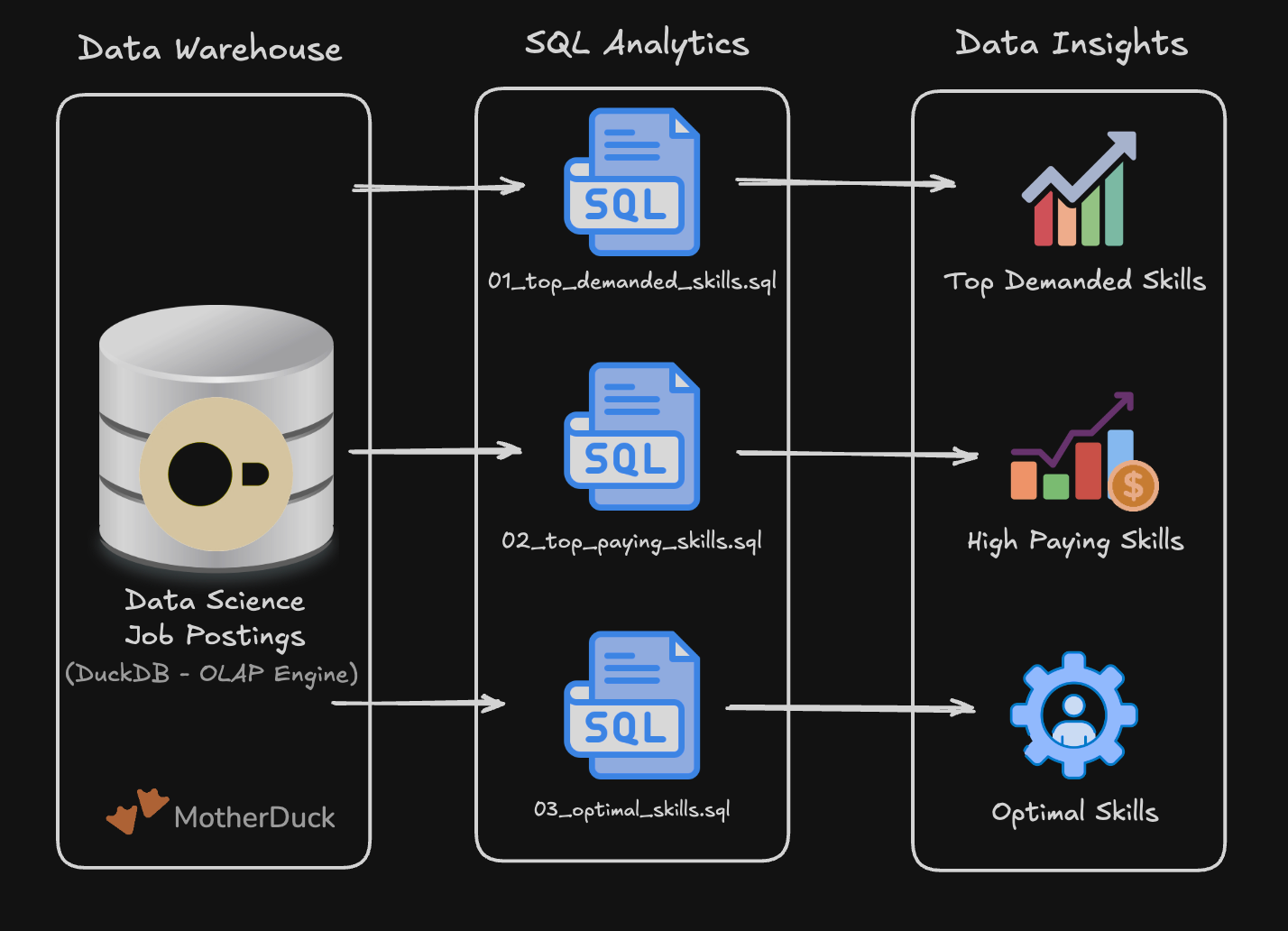
Explore real-world job data using SQL to uncover in-demand skills, salary trends, and hiring patterns. You’ll practice EDA techniques and build your first portfolio-ready project.
🔗 Project #1 Repo
👉 https://lukeb.co/sql-de-project1
🏗️ Project 2 — Data Pipeline: Warehouse + Mart
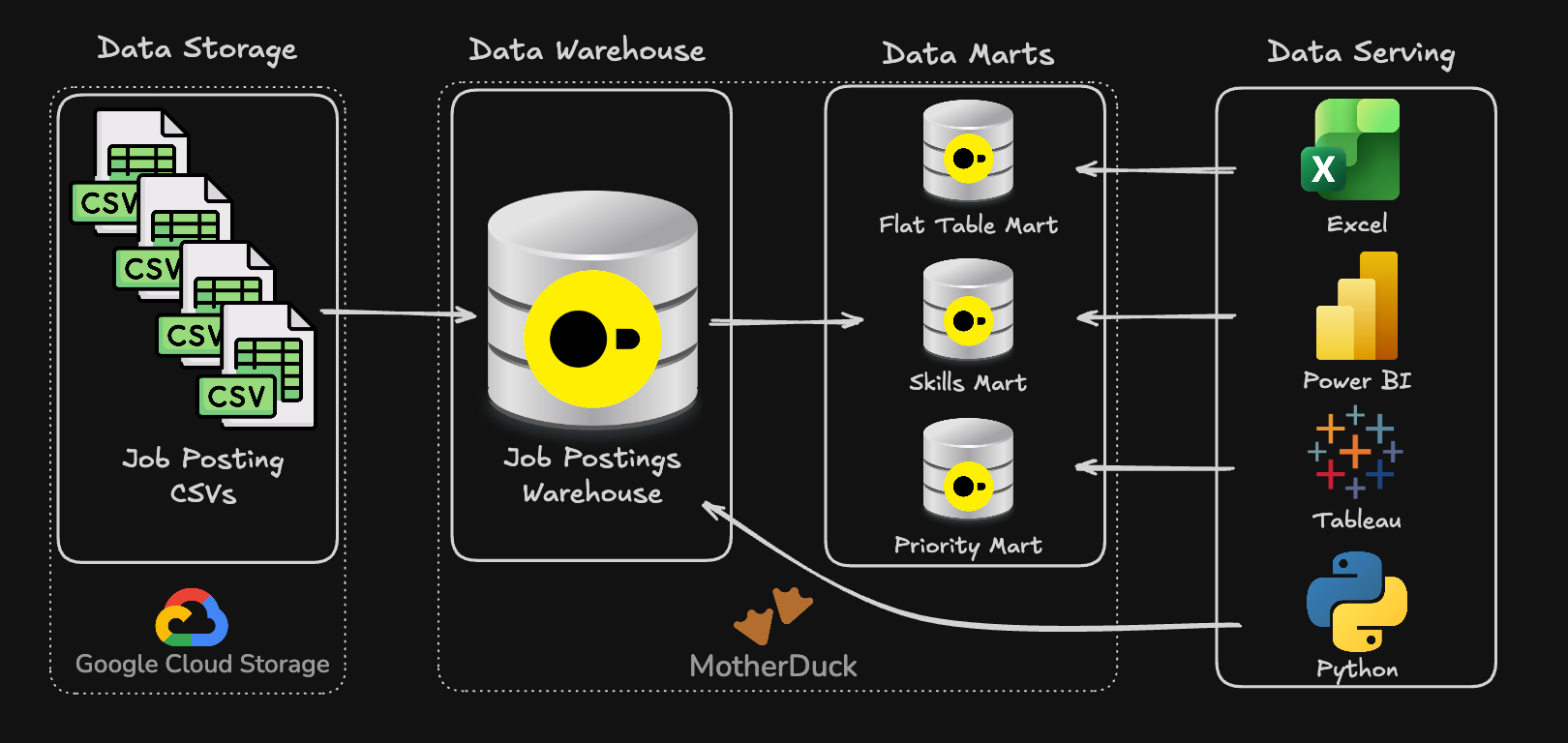
Build a production-style SQL pipeline — modeling a data warehouse and creating analytical marts. You’ll apply data modeling, transformations, and best practices to deliver a second portfolio project.
🔗 Project #2 Repo
Supporter Resources
📝 Practice Problems
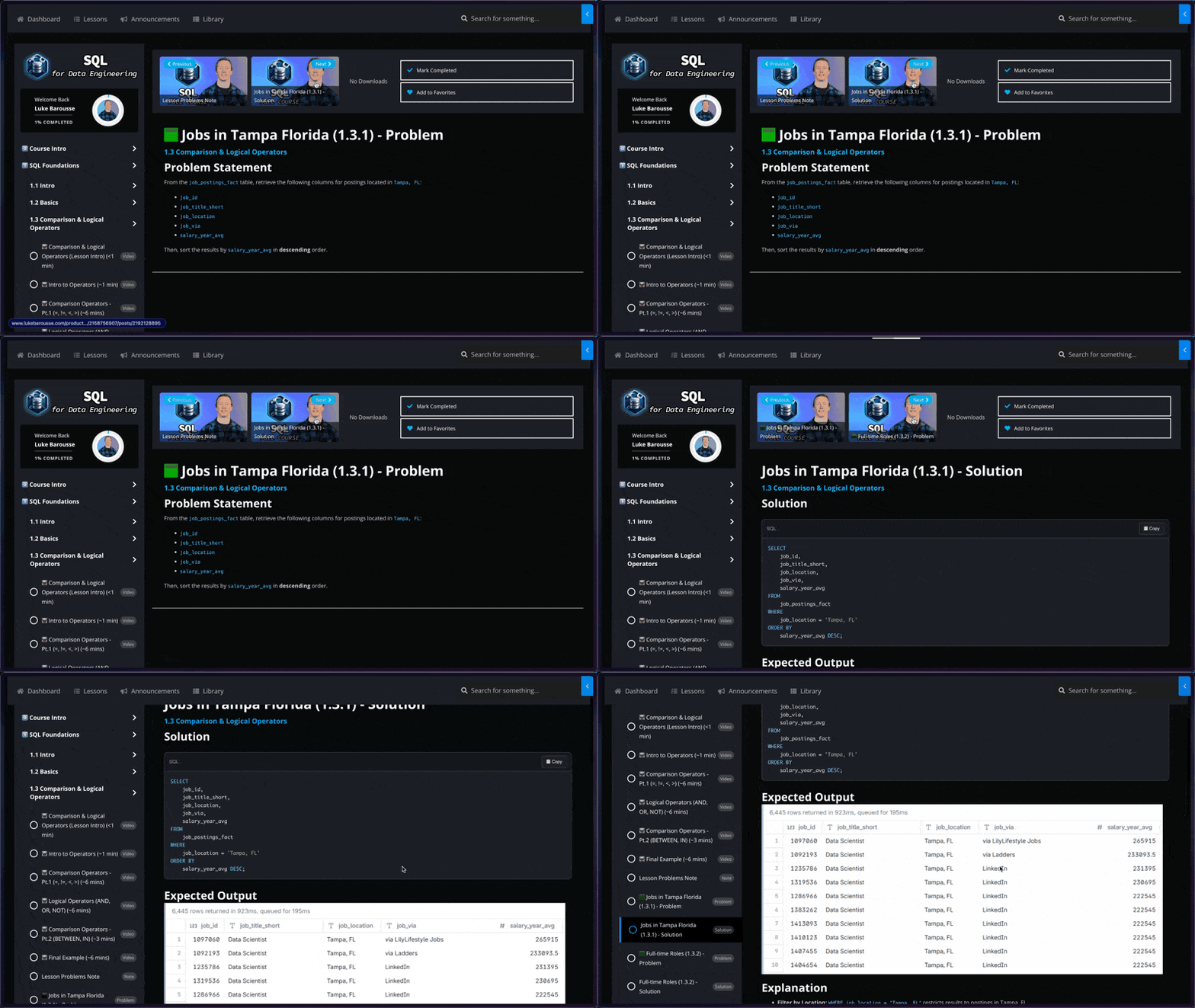
🧩 170+ Interview-Level Problems: Learn SQL faster with meticulously designed exercises spanning a range from easy to challenging
🔍 Detailed Solutions and Results: Every problem is accompanied by a comprehensive solution and your expected query results
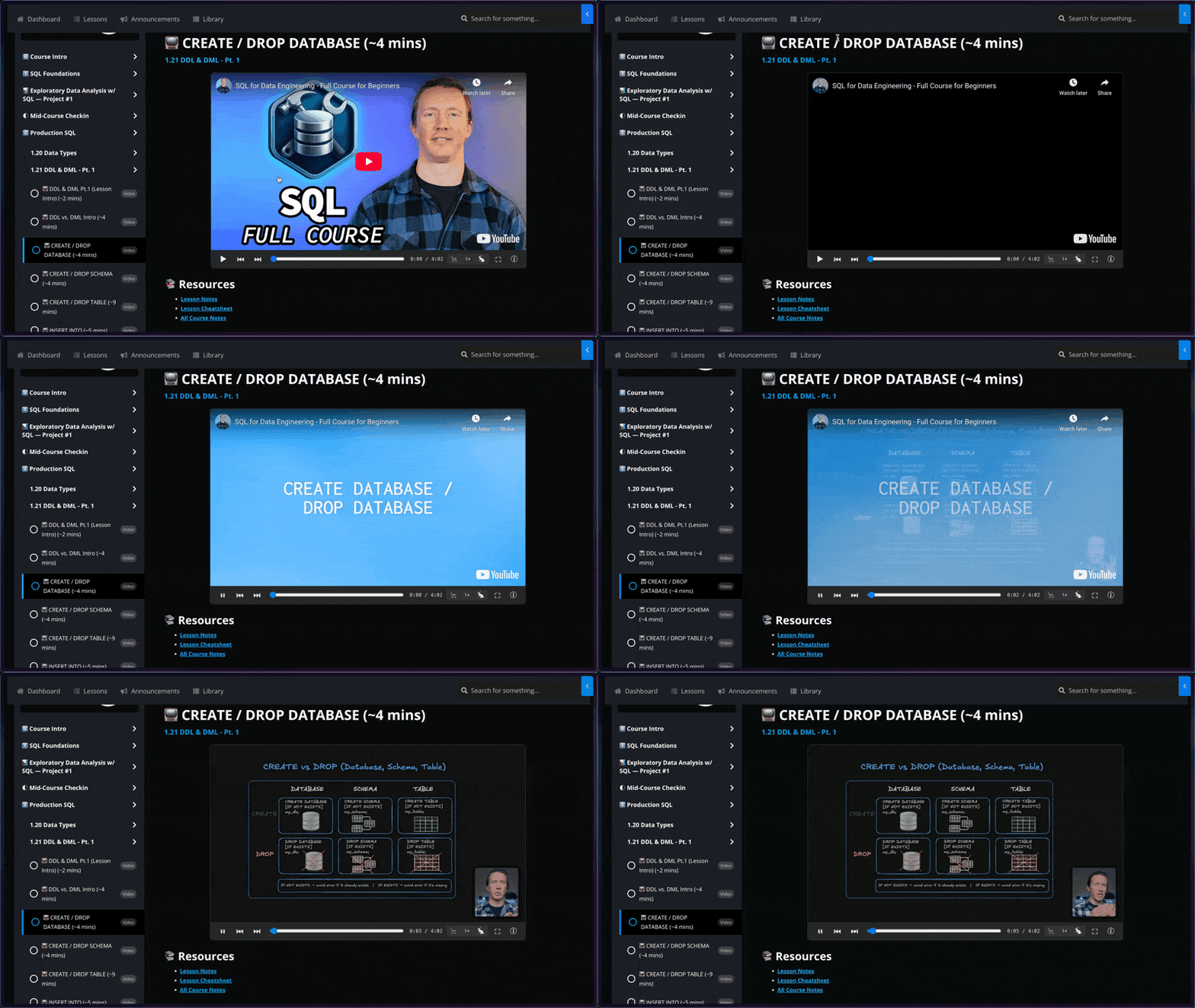
📺 Structured Video Lessons
🚢 Navigate with Ease: Jump instantly to any lesson or specific topic within the course – no more wasting time scrubbing through hours of video to find what you need
🧠 Focused Learning: Master concepts more effectively with dedicated, bite-sized videos for each distinct lesson, allowing for better concentration and easier review
🗒️ Lesson Notes & Cheat Sheets
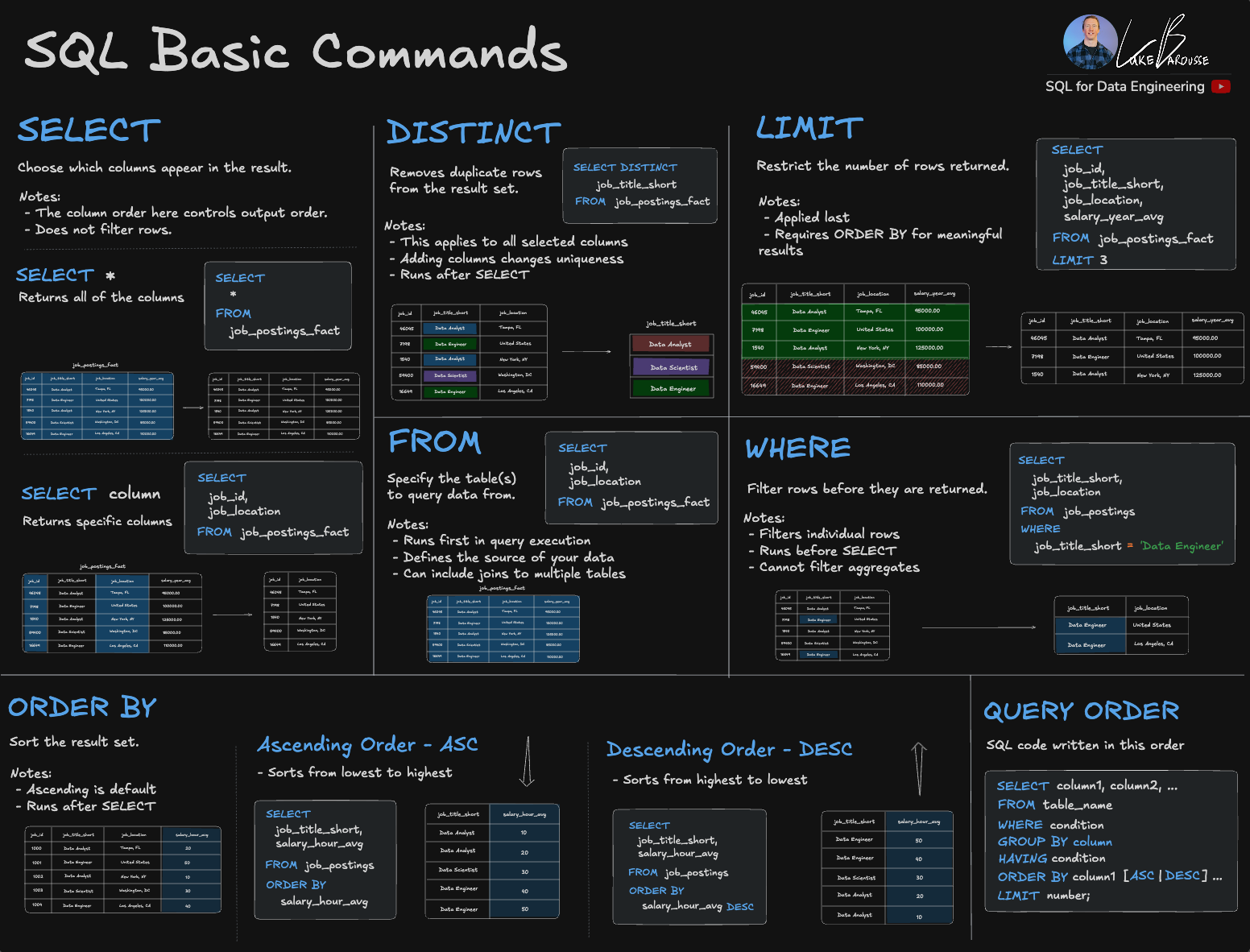
📖 Structured Lesson Notes: Step-by-step walkthroughs for every topic, helping you follow along with each lesson and understand why queries and pipelines are built the way they are
📋 Practical Cheat Sheets: Quick-reference guides for core SQL syntax, transformations, and data engineering concepts you’ll reuse across projects
✨ Certificate of Completion
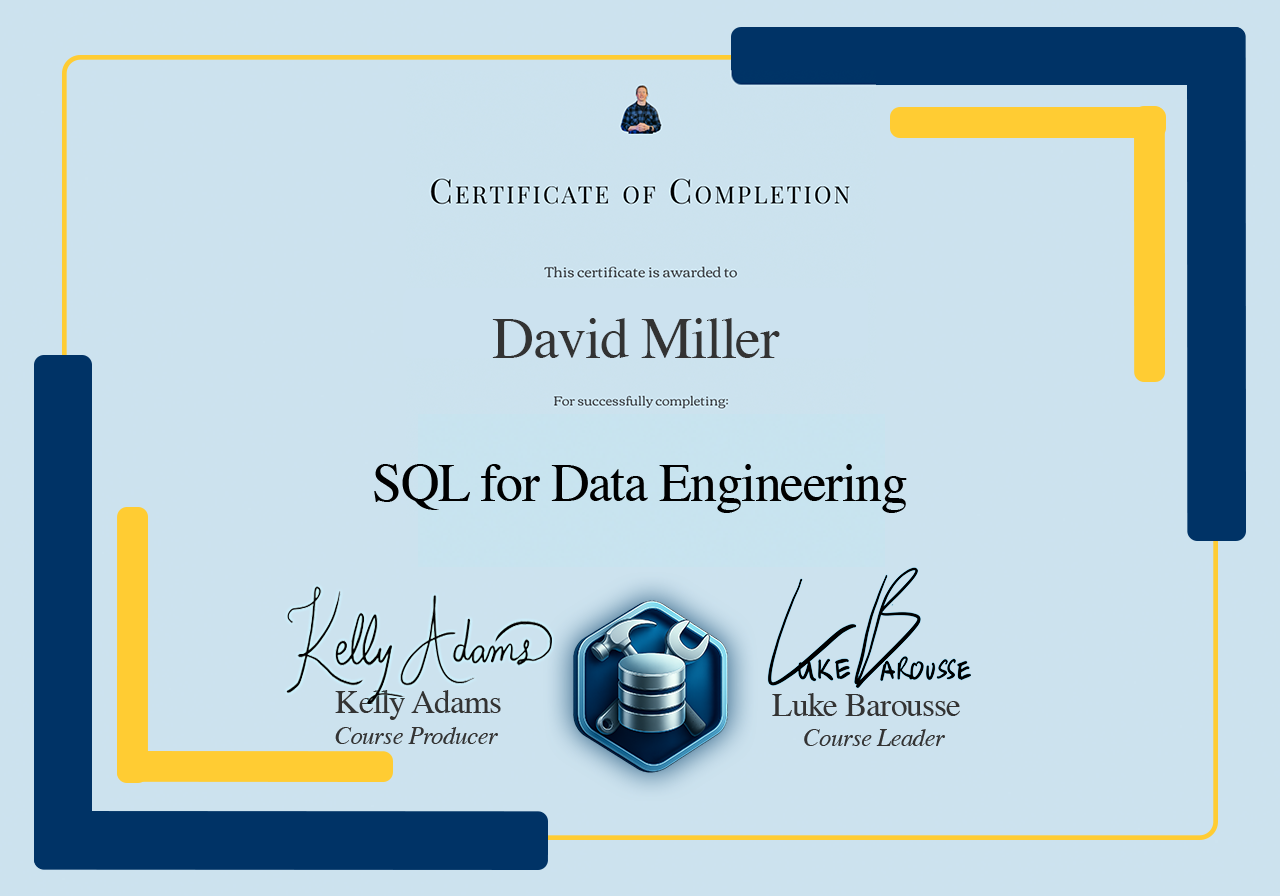
🎖️ Certificate of Completion: Receive a certificate to validate your new skills and enhance your LinkedIn profile
🧑💻 Showcase Experience: Share how you used real-world data to help solve a problem for data professionals

About the Instructors
Luke Barousse - Course Instructor

🌎 Real-world Experience with SQL
Spearheaded innovative projects in collaboration with MrBeast's team, integrating popular tools like SQL & Python.
💡🤖 Sharing Knowledge about Data & AI
Guides a community of +600,000 data nerds in harnessing analytical tools to revolutionize their professional workflows.
🎓 Trusted Course Developer
Imparted wisdom to +30,000 learners on DataCamp in leveraging analytical tools to elevate their career efficiency.
Kelly Adams - Course Producer
🕹️ Hands on Experience with SQL
Driving strategic decisions within the social gaming industry at Golden Hearts Games, using popular tools like Google BigQuery (SQL), Dataform (dbt) and Looker.
📊 Analytics Engineering & Data Pipelines
Building scalable data pipelines that support product, finance, and growth teams with reliable, decision-ready metrics.
📹 Course Producer for Data Analytics Content
Educating an audience of +600,000 analysts about the latest data analytical tools to improve their professional skill sets.

Rikki Singh - Content Developer

🧑💻 Hands-on SQL & Analytics
Works across gaming, entertainment, and marketing—using Redshift and BigQuery to query and model data, and builds decision-ready dashboards in Looker and Tableau.
💼 Director-Level Operator
Leads analytics initiatives—bringing a “what matters to the business” lens to every lesson and project.
🎬 Course Producer for Data Analytics Content
Builds high-signal practice problems by benchmarking a wide range of learning platforms and question styles, then translating the best patterns into realistic, interview-ready exercises.
100% Satisfaction Guarantee or Your Money Back
⏱️ If you don’t feel the course problems and notes help you learn this tool as it has for countless others, I’ll refund your money!
📫 Email me within 30 days of purchasing the course on why you are unsatisfied, and I’ll return the full purchase price to you ASAP.
